# 如何获取Discord的邀请链接

### 1. 确保您已成功加入 Titan 的 Discord

<figure><img src="/files/oGfBNCQ7QHgdZiunXTTE" alt="" width="563"><figcaption></figcaption></figure>

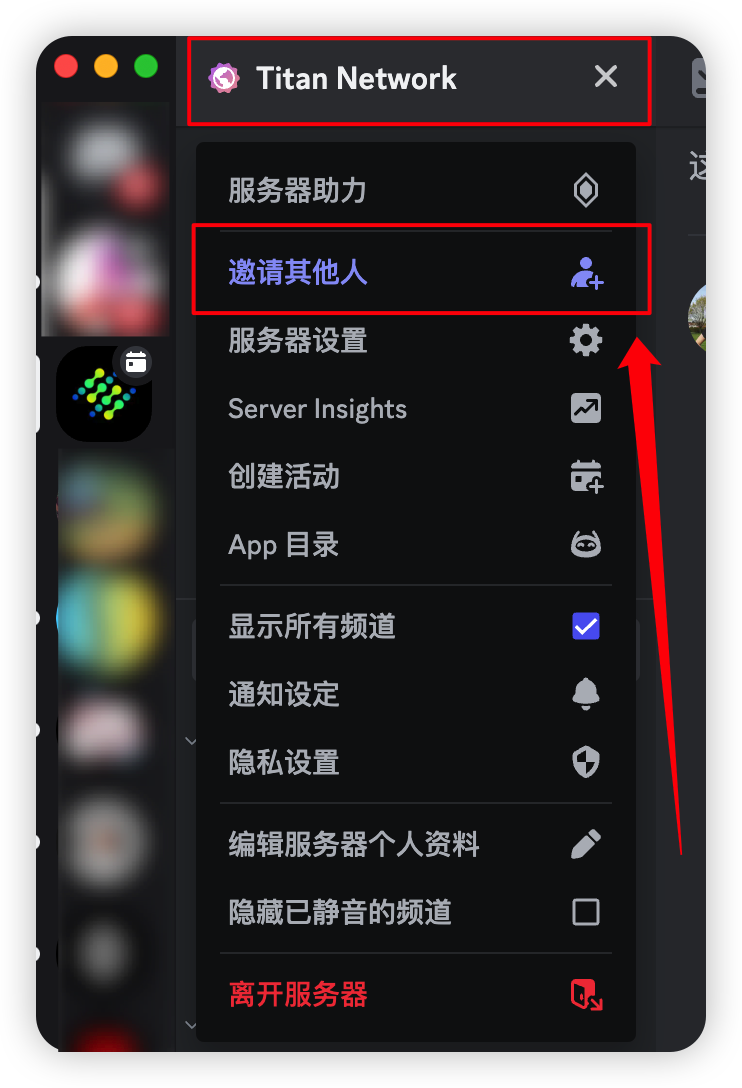
### 2. 获取你的专属邀请链接

<figure><img src="/files/X93hv1R6KttK26zpl4qh" alt="" width="371"><figcaption></figcaption></figure>

### 3. 将邀请链接发送给好友 / 各个群组

<figure><img src="/files/b91wf51owZfLb1XQESgW" alt="" width="375"><figcaption></figcaption></figure>

### ⚠️ 注意事项:&#x20;

1. 邀请链接有7天的有效期，请注意及时替换新的邀请链接。
2. 请勿使用永久的邀请链接！这是一个公用的邀请链接，会导致你的邀请记录无法被统计到。


---

# Agent Instructions: Querying This Documentation

If you need additional information that is not directly available in this page, you can query the documentation dynamically by asking a question.

Perform an HTTP GET request on the current page URL with the `ask` query parameter:

```
GET https://titannet.gitbook.io/titan-network-cn/he-xie-er-ce-shi-wang/guan-yu-he-xie-er-ce-shi-wang/chang-jian-wen-ti/ru-he-huo-qu-discord-de-yao-qing-lian-jie.md?ask=<question>
```

The question should be specific, self-contained, and written in natural language.
The response will contain a direct answer to the question and relevant excerpts and sources from the documentation.

Use this mechanism when the answer is not explicitly present in the current page, you need clarification or additional context, or you want to retrieve related documentation sections.